
Getting Started
Optimize HRAs
Lead Generation
Nurture Journeys
Data & Integrations
Unlock HRA Documentation
Medicom HRA Documentation
Build a URL Tool: Best Practices for UTM Naming, Tracking & HRA Promotion Attribution Parameters
This guide will help you understand how to use the Build a URL tool within the HRA Console and how it supports your broader UTM strategy, campaign tracking, and multi-channel HRA promotion. Whether your team already has a UTM management process—or you’re creating one for the first time—this article provides clear best practices for planning, building, and tracking your HRA URLs.
What the Build a URL Tool Does
The Build a URL tool allows you to:
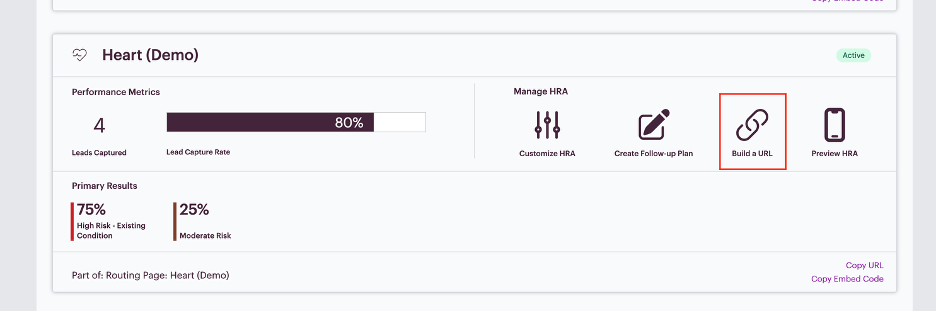
- Create unique, trackable HRA URLs: Append UTM parameters (campaign, source, medium, content, term) to any HRA URL with just a few clicks—no manual editing needed.
- Manage all URL variations in one place: Easily see all URLs you've created for an HRA, helping teams stay organized and avoid inconsistencies in UTM naming.
- Generate QR Codes automatically: Each URL can generate a downloadable .png QR code you can add to print or digital assets—perfect for organic promotion in waiting rooms, mailers, community events, or employee engagement.
- Standardize and scale UTM use: Ideal for teams without a formal UTM process—this tool helps enforce consistency and accuracy across campaigns.
Why UTMs Matter
UTMs provide the source of truth for how participants arrive at your HRAs.
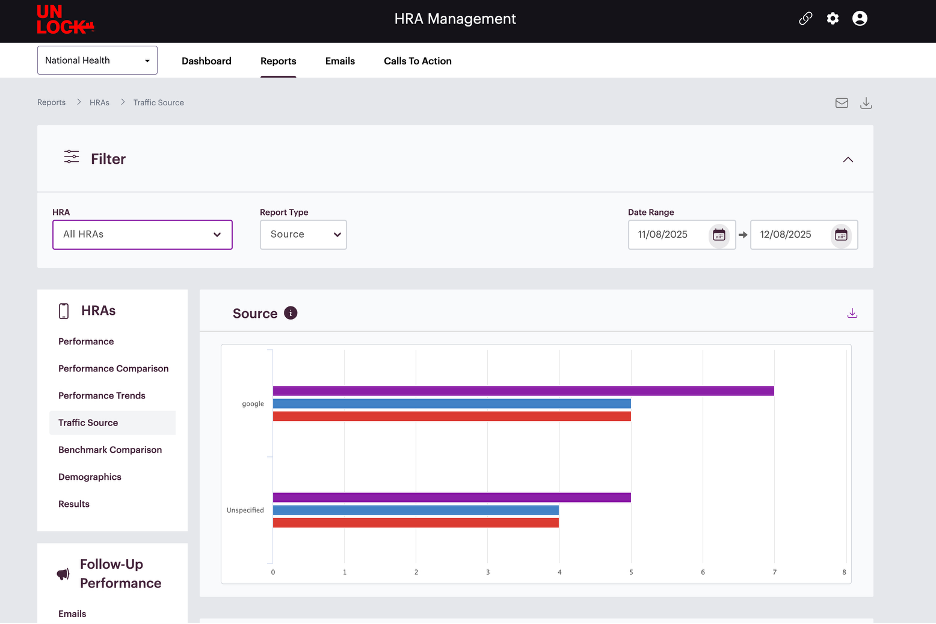
Without them, all completions will show up as "unspecified" traffic in your HRA Console reporting.
UTMs help you:
- Identify high-performing channels
- Track which campaigns drive HRA starts & completions
- Make data-driven budget decisions
- Improve targeting and conversion strategies
- Pass UTM attribution downstream into connected CRMs, CDPs, and marketing automation systems
Any system connected to your HRA console (e.g., Personify Health, Salesforce, Marketo) receives the UTM data as well, helping complete the full-funnel story.
UTM Basics: What They Are & How They Work
-
UTMs are tags added to the end of a URL that help you track:
| Parameter | What it Tracks | Example |
| utm_source | Where traffic originated | google, facebook, email, organic |
| utm_medium | The marketing channel | paid-search, paid-social, newsletter |
| utm_campaign | The campaign name | heart-month-2025 |
| utm_content | Creative variations | carousel1 vs static2 |
A complete URL might look like:
https://hra.yourorg.com/heart?utm_source=google&utm_medium=paid-search&utm_campaign=heart-month&utm_content=ad1
How to name UTMs (Best Practices)
UTM naming conventions depend on how granular your analytics need to be. Here are tiers of sophistication:
Tier 1: Simple & Broad (Good for new or small teams)
Use only source to understand major traffic buckets.
Example:
?utm_source=organic
Use this when:
- Your goal is only to differentiate paid vs. organic
- You don’t need channel-level detail
- You want to get started quickly with minimal setup
Tier 2: Moderate Detail (Recommended standard)
Use source + medium to understand both origin and channel.
Example for a blog article: ?utm_source=organic&utm_medium=blog
Example for homepage: ?utm_source=organic&utm_medium=homepage-feature
Example for social post: ?utm_source=organic&utm_medium=social-post
Use this when:
- You want to differentiate where organic traffic is coming from
- You want reporting beyond “organic”
Tier 3: Advanced (For mature teams or detailed attribution)
Use source + medium + campaign + content.
Example for a paid search campaign: ?utm_source=google&utm_medium=paid-search&utm_campaign=knee-month&utm_content=ad-group1
Use this when:
- You run multiple promotions per month
- You are A/B testing campaigns
- You need deep attribution for executive dashboards
When to Hardcode UTMs vs. Use the Embed Code Script
This is one of the most common points of confusion for clients—so here’s the clean breakdown.
Hardcode UTMs when…
You are certain traffic reaches the HRA from only one channel.
Examples:
- A paid search landing page where the only CTA is “Take the HRA”
- A QR code printed on a mailer where recipients scan and go directly to the HRA
- A flyer in a waiting room
- A podcast episode description with a tracked link
Why Hardcode?
Because all visitors come from a single known origin, and you want that attribution preserved.
Use the Embed Code Script when…
Traffic comes from multiple channels before landing on the page where the HRA link lives.
Examples:
- Both paid search and paid social link to a cardiovascular service line page
- Organic homepage traffic and email traffic converge on a service line page
- A paid landing page links deeper into a service line section
Why Embed?
You want the UTMs from the parent page to automatically transfer to the HRA link so your attribution is accurate.
Example: Paid search → Service line page → HRA
- Without embed code: HRA would lose the paid search attribution
- With embed code: HRA correctly attributes “paid-search” via the transferred UTM parameters
Quick Decision Tree: Hardcode vs Embed Code Script
| Scenario | Recommendation |
| A dedicated paid search landing page drives traffic directly to HRA | Hardcode UTMs |
| A QR code printed on a billboard or waiting room poster | Hardcode UTMs |
| Multiple channels funnel into the same service line page | Use Embed Code Script |
| A podcast description linking directly to HRA | Hardcode UTMs |
How the Build a URL Tool Supports This Strategy
The Build a URL tool helps ensure that every link used across your organization is:
- Consistent
- Trackable
- Easy to manage
- Accessible for teams of all technical levels
It solves four key problems:
- No more manually editing URLs
- No more inconsistent UTM naming across departments
- Centralized visibility into all HRA URLs created
- QR code creation included so offline campaigns are easy to track
This tool becomes your “UTM command center.”
Reporting: How UTMs Power Better Decisions
Once UTMs are in place, you’ll see accurate attribution in:
HRA Console → Traffic Source Reporting
This lets you answer:
- Which channels drive the most completions?
- Which campaigns underperform?
- Where should marketing invest campaign dollars?
CRMs & CDPs via API
If connected, UTMs pass through automatically to tools such as:
- Personify Health
- Salesforce
- Marketo
- Consumer data platforms
This enables:
- Multi-touch attribution
- Improved lead scoring
- Tailored nurture journeys
- Downstream ROI reporting
Summary: When to Use the Build a URL Tool
Use the Build a URL tool when you need to:
- Create unique HRA links for paid campaigns, blog posts, organic placements, or QR codes
- Manage consistent UTMs across your organization
- Support clean, accurate reporting
- Track offline or internal employee engagement
- Enable easy sharing of trackable links across departments
This tool ensures your attribution is accurate—and your insights actionable.
If you need any help navigating the HRA Management Console or have features you wish to see added, don’t hesitate to contact your Client Success representative!
