
Getting Started
Optimize HRAs
Lead Generation
Nurture Journeys
Data & Integrations
Unlock HRA Documentation
Medicom HRA Documentation
HRA Selection Pages: Best Practices and Use Cases
The HRA Selection Page is a feature that creates a centralized landing experience where participants can choose from multiple related Health Risk Assessments (HRAs) within a broader service line.
Instead of sending users to a single HRA, this feature creates a guided “choose your path” experience that helps participants select the assessment most relevant to their needs.
This is especially useful for service lines that offer multiple related HRAs, such as weight management or orthopedics.
Example: Weight management selection page
A Weight Management selection page might allow participants to choose from:
- Surgical Weight Loss
- Medical Weight Loss
- Healthy Weight
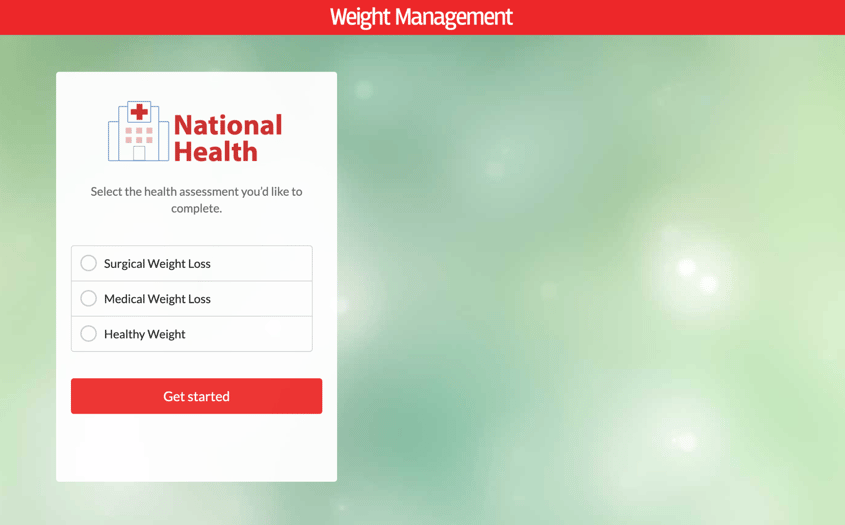
Once a participant makes a selection, they are routed directly into the chosen HRA.
Why This Matters
It simplifies the participant experience
When multiple HRAs exist within the same service line, it may not be clear which one is the best fit.
An HRA Selection Page reduces that friction by helping participants:
- Quickly understand their options
- Select the most relevant assessment
- Move forward with more confidence
It supports engagement and completion
Rather than presenting multiple HRA links across different pages, this feature creates one clear starting point.
This can help:
- Reduce drop-off caused by confusion
- Increase engagement across related HRAs
- Improve overall completion rates
It supports a hub-style campaign strategy
HRA Selection Pages work well as a centralized destination when multiple HRAs may be relevant to the same audience.
This is especially useful for:
- Paid campaigns targeting a broad service line
- Email campaigns where more than one pathway may apply
- Organic content and blog traffic
- QR codes and offline promotion
Instead of choosing a single HRA to promote, you can promote one destination and let the participant choose the path that fits best.
For more guidance on campaign strategy, see our companion article: HRA Paid Promotion Best Practices.
It supports service line growth
This feature helps surface all relevant programs within a service line, not just a single entry point.
For example:
Weight management
- Healthy Weight HRA
- Medical Weight Loss HRA
- Bariatric Surgery HRA
Orthopedic services
- Back & Neck HRA
- Knee & Hip HRA
- Shoulder & Elbow HRA
This approach creates broader visibility across services and helps participants make more informed decisions.
Common Use Cases
Paid media campaigns
Instead of building separate campaigns for each HRA, you can:
- Run one campaign for a broader service line
- Send traffic to the selection page
- Let participants choose the path that fits their needs
Blog and content strategy
When publishing content that speaks to a broader service line, such as “Weight Loss Options,” link to the selection page instead of a single HRA so participants can explore multiple options.
Email campaigns
For newsletters or nurture campaigns, use a broader CTA such as Explore your weight loss options and link to the selection page rather than multiple assessments.
QR codes and offline promotion
Selection pages work well as destinations for:
- Waiting room signage
- Direct mail
- Flyers
- Event materials
This removes the need to create multiple QR codes for separate HRAs.
Homepage or hub page integration
Selection pages can also serve as:
- A bridge between homepage CTAs and individual HRAs
- A structured entry point from broader Health Tools or Patient Resources sections
Employee engagement hub
Some organizations create a single HRA Selection Page specifically for employee engagement.
Instead of sharing multiple HRA links across internal communications, teams can promote a single central destination where employees can explore and choose from all available assessments.
This approach can strengthen internal campaigns by:
- Reducing confusion caused by multiple links
- Creating a more streamlined experience
- Encouraging participation across multiple HRAs
Example
An internal Know Your Health campaign might link to one page featuring:
- Heart HRA
- Weight Management HRAs
- Diabetes HRA
- Sleep HRA
From there, employees can choose the assessment most relevant to them, creating a more personalized and engaging experience.
💡 Tip: Many clients pair this approach with internal wellness initiatives or incentives, such as raffles or fitness-related rewards, to encourage participation and support a broader culture of health.
Best Practices
Keep it simple
Limit the number of options to two to four HRAs so the page feels clear and manageable.
Group by service line
Only include HRAs that clearly belong to the same service category.
Use clear labels
Make each option easy to understand.
For example:
- Medical Weight Loss instead of GLP-1 Eligibility
- Knee & Hip Pain instead of Joint Assessment
Align with campaign messaging
The language on the selection page should match the messaging used in your:
- Ads
- Emails
- Landing pages
Extend the journey with recommended CTAs
After a participant selects and completes an HRA, you can continue the journey using features such as Recommended HRA CTAs. This helps guide participants into additional relevant assessments based on their responses.
This creates a more connected, multi-step experience across service lines.
💡 Learn more: Recommended HRA CTAs
How to Get Started
HRA Selection Pages are configured and customized by the Unlock team.
To implement this feature:
- Identify the service line or service lines where multiple HRAs exist
- Determine which HRAs should be included
- Work with your Client Success Director to:
- Configure the page
- Customize branding and design
- Align messaging with your campaigns
Key Takeaways
- HRA Selection Pages create a centralized entry point for multiple related HRAs
- They simplify decision-making for participants
- They support more flexible campaign strategies
- They increase visibility across service lines
- They pair well with paid campaigns and Recommended HRA CTAs to create a more connected participant journey
If you’d like to learn more, check out these resources:
If you need any help navigating the HRA Management Console or have features you wish to see added, don’t hesitate to contact your Client Success representative!